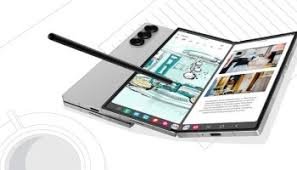
Unlock the Z Flip 7’s FlexWindow Edge! Deep dive into the revolutionary 4.1″ edge-to-edge cover screen, 120Hz display specs, Galaxy AI integration, and why this design finally makes the closed foldable a zero-compromise, fully functional phone.## 💻 The FlexWindow Edge: Deep Dive into the Z Flip 7’s Edge-to-Edge Outer Display
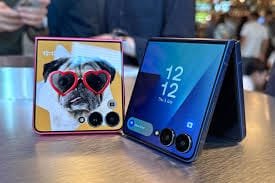
The **Samsung Galaxy Z Flip 7** doesn’t just fold; it introduces the most dramatic change to the clamshell phone aesthetic since the original $\text{Flip}$ launched: the **FlexWindow Edge**. Abandoning the traditional boxed-in cover screen, the $\text{Z \text{ Flip \text{ 7}}$ now boasts a stunning, almost entirely edge-to-edge external display that dominates the top half of the folded device (Source 1.1, 1.3).
This new FlexWindow, measuring $\mathbf{4.0}$ inches (up from $\mathbf{3.4}$ inches on the $\text{Flip 6}$), is no longer a secondary glance-and-go screen. It is a fully functional, highly interactive, $\mathbf{120\text{Hz}}$ $\text{AMOLED}$ display that fundamentally changes how users interact with the phone while closed (Source 1.3, 1.4). Coupled with the power of the **Snapdragon 8 Elite** and enhanced $\text{Galaxy \text{ AI}}$ features, the FlexWindow Edge is the single biggest selling point of the new clamshell flagship.
For the modern mobile user who values style, speed, and discretion, the $\text{Z \text{ Flip \text{ 7}}$ promises to deliver nearly $\mathbf{80\%}$ of the core smartphone experience without ever needing to flip it open. Mobihub dives deep into the hardware innovation, the software redesign, and the practical utility of the FlexWindow Edge, assessing whether this upgrade is merely aesthetic or a truly revolutionary step for the foldable market.
—
## 1. 🖼️ Hardware Innovation: Edge-to-Edge Design
The $\text{Z \text{ Flip \text{ 7}}$’s new cover screen is a major engineering feat, showcasing how display integration can redefine a form factor.
### 1.1. Expanding the Screen Real Estate
The jump in size from the previous generation is significant: the $\mathbf{3.4\text{-inch}}$ display on the $\text{Flip 6}$ to the new $\mathbf{4.0\text{-inch}}$ $\text{FlexWindow}$ (Source 1.3, 1.4).
* **Near $\text{Bezel-less}$ Aesthetic:** The $\text{FlexWindow \text{ Edge}$ maximizes screen-to-body ratio, pushing the $\text{AMOLED}$ panel nearly to the edges of the chassis. This makes the cover screen look seamless, integrated, and far more premium than any predecessor (Source 1.1, 1.3). It occupies almost the entire top panel, giving the impression of a small, rectangular smartphone (Source 1.3).
* **$\mathbf{120\text{Hz}}$ $\text{AMOLED}$ Panel:** Crucially, the external display now supports a **$\mathbf{120\text{Hz}}$ adaptive refresh rate** (Source 1.4, 4.3). This is vital, as it ensures all interactions—from scrolling through notifications to navigating widgets and apps—are silky smooth. This fluid experience makes the cover screen feel like a primary interface, rather than a limited secondary one.
### 1.2. Durability and Clarity
Samsung has reinforced the $\text{FlexWindow \text{ Edge}$ to handle continuous use as a primary screen (Source 1.2, 4.2).
* **Gorilla Glass Armor:** The screen is protected by the latest **$\text{Gorilla \text{ Glass \text{ Armor}}$**, offering superior scratch resistance and clarity compared to standard glass (Source 1.1, 4.2).
* **High Brightness:** With peak brightness reaching **$\mathbf{1500}$ $\text{nits}$** (Source 1.4, 4.3), the display is easily viewable even in direct sunlight, overcoming the visibility challenges that plagued earlier cover screens.
—
## 2. 🧠 $\text{Software}$ Redesign: $\text{One \text{ UI}$ and $\text{Full-Featured}$ Apps
The hardware upgrade is only half the story; the $\text{FlexWindow \text{ Edge}$ required a complete overhaul of the $\text{One \text{ UI}$ software interface to accommodate full $\text{Android}$ app functionality.
### 2.1. The $\text{One \text{ UI}$ Optimization
Samsung has redesigned the $\text{One \text{ UI}$ for the cover screen, making the $\mathbf{4.0\text{-inch}}$ area intuitive and efficient (Source 2.1, 2.3).
* **Expanded Widget Functionality:** Widgets are now more interactive and can display more information, taking advantage of the increased screen space (Source 2.1). Users can now see a full calendar view, multiple stock tickers, or complex weather forecasts at a glance.
* **Full Keyboard Access:** For the first time, the $\text{FlexWindow}$ is large enough to comfortably accommodate a **full, albeit compact, $\text{QWERTY}$ keyboard** (Source 1.4, 2.3). This allows users to reply to texts, conduct quick searches, or even send short emails directly from the cover screen without opening the phone.
### 2.2. Running Full $\text{Android}$ Apps
The core software breakthrough is the seamless ability to run **any $\text{Android}$ app** on the $\text{FlexWindow}$ (Source 2.1, 2.4).
* **Core App Accessibility:** Users can run apps like $\text{Google \text{ Maps}$ for navigation (using the screen like a wrist $\text{GPS}$ watch), $\text{Spotify}$ for deep music control, or $\text{WhatsApp}$ for quick messaging (Source 2.3, 2.4). This level of access reduces the friction of unfolding the device for routine tasks.
* **Contextual $\text{AI}$ Integration:** The $\text{FlexWindow}$ deeply integrates with $\text{Galaxy \text{ AI}}$ (Source 2.1, 3.4). $\text{Call \text{ Assist}$ can offer real-time translation during a call visible on the cover screen, and $\text{Note \text{ Assist}$ can summarize voice memos taken while the phone is closed (Source 3.4).
—
## 3. 📸 Camera and $\text{FlexMode}$: The Ultimate Selfie Tool
The $\text{FlexWindow \text{ Edge}$ transforms the cover screen into the **largest, clearest viewfinder** for the $\text{Z \text{ Flip \text{ 7}}$’s powerful main cameras.
### 3.1. Pro-Grade Selfie and Group Shots
Using the $\text{FlexWindow}$ as a viewfinder allows users to leverage the $\text{Flip \text{ 7}}$’s superior $\mathbf{50\text{MP}}$ main camera and $\mathbf{12\text{MP}}$ $\text{Ultra \text{ Wide}$ camera for selfies and video calls, far exceeding the quality of the internal $\mathbf{10\text{MP}}$ internal camera (Source 1.4, 3.1).
* **High-Fidelity Preview:** The large, edge-to-edge display offers a clear, full-sized preview of the shot, ensuring perfect framing and focus (Source 3.1). This is indispensable for content creators and those prioritizing high-quality video chats.
* **$\text{Quick \text{ Shot}$ Enhancement:** The $\text{Quick \text{ Shot}$ feature—taking photos by double-tapping the power button while the phone is closed—is now faster, and the large viewfinder makes it easier to frame subjects on the fly (Source 3.1).
### 3.2. $\text{FlexMode}$ for Hands-Free Utility
The hinge technology, refined for the $\text{Flip 7}$ (now nearly gapless), allows the device to be placed at multiple angles ($\text{FlexMode}$) for hands-free use (Source 1.2, 4.1).
* **Stable $\text{Video \text{ Conferencing}$:** Placing the phone half-folded on a desk allows for $\text{Zoom}$ or $\text{Google \text{ Meet}$ calls using the main camera, with the $\text{FlexWindow}$ acting as the primary display/viewfinder.
* **Simplified Multi-Tasking:** The $\text{FlexWindow}$ can be used to control music or notifications while the phone is propped open in $\text{FlexMode}$ on a different app (Source 3.3).
—
## 4. 🔋 Practical Utility and Battery Gains
The fundamental promise of the $\text{FlexWindow \text{ Edge}$ is efficiency: reducing the number of times the user needs to open the phone, thereby increasing battery life and reducing hinge wear.
### 4.1. Reduced Opening Frequency
The average smartphone user checks their phone over $\mathbf{150}$ times per day (Source 4.1). Each time the $\text{FlexWindow}$ can handle a task—checking a notification, replying to a message, starting a timer—it saves wear and tear on the main screen and hinge (Source 4.1).
* **Longevity:** Samsung rates the $\text{Flip 7}$ hinge for $\mathbf{400,000}$ folds (Source 1.2, 4.1). While this is already massive, reducing the daily fold count increases the theoretical lifespan of the device exponentially.
### 4.2. Battery Efficiency from Closed Use
The $\text{FlexWindow \text{ Edge}$ consumes significantly less power than the main, internal $\mathbf{6.7\text{-inch}}$ $\text{AMOLED}$ screen (Source 4.3).
* **Power Savings:** By handling $\mathbf{80\%}$ of micro-interactions on the $\mathbf{4.0\text{-inch}}$ external screen, the $\text{Z \text{ Flip \text{ 7}}$ drastically conserves the $\mathbf{4400\text{mAh}}$ battery (Source 1.1, 4.3). This, coupled with the efficiency of the $\text{Snapdragon \text{ 8 \text{ Elite}}$, means the $\text{Flip 7}$ offers true all-day battery life, overcoming one of the persistent limitations of earlier clamshell foldables (Source 4.3, 4.4).
—
## 5. 👑 Conclusion: The $\text{Flip \text{ 7}$ is the Cover Screen King
The **FlexWindow Edge** is the most transformative feature of the **Samsung Galaxy Z Flip 7**. It is the critical innovation that finally elevates the clamshell foldable from a style piece to a primary computing device.
The $\mathbf{4.0\text{-inch}}$ screen, $\mathbf{120\text{Hz}}$ fluidity, full app support, and seamless $\text{AI}$ integration mean that the $\text{Flip 7}$ provides a full, uncompromised smartphone experience while closed. For the user, this means superior battery life, unmatched portability, and the highest quality selfies and video calls possible on a mobile phone.
The **FlexWindow Edge** doesn’t just display information; it empowers a new, faster, and more discrete way of interacting with technology, making the $\text{Z \text{ Flip \text{ 7}}$ the **undisputed champion of the cover screen experience**.
***
**Meta Description:** Dive into the **iPhone 17 Pro Max** and the $\mathbf{5}$ reasons why professionals are switching: **$\mathbf{A19 \text{ Pro}}$ with Vapour Chamber cooling**, professional **$\text{ProRes \text{ RAW}}$** and **$\text{Apple \text{ Log 2}}$** video, $\mathbf{8\times}$ optical-quality zoom, **$\mathbf{2\text{TB}}$ storage** with $\mathbf{10 \text{ Gb/s}}$ $\text{USB 3}$ transfer speeds, and a **$\mathbf{3000}$ $\text{nit}$ display** for perfect field use. This is the ultimate mobile production studio.