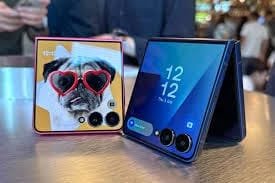



The Samsung Galaxy Z Flip 7 isn’t just a stylish clamshell phone; it’s a profound shift in how we capture content. While traditional smartphones force users to choose between bulky tripods, wobbly handheld footage, or the inferior quality of a small front-facing camera, the Z Flip 7 offers a graceful, high-quality solution: Flex Mode.
For the modern content creator, vlogger, or even the casual user who just wants a stable, well-framed shot, the Z Flip 7 eliminates the need for extra gear. It leverages its unique folding hinge to become its own self-supporting, self-framing camera rig, turning mundane shooting scenarios into hands-free, professional-looking captures.
This comprehensive guide explores how Flex Mode fundamentally transforms the Z Flip 7 into the ultimate mobile vlogging and photography tool, highlighting the key features that set it apart from every other phone on the market.
1. The Core Innovation: Flex Mode as a Built-in Tripod
The term “Flex Mode” is Samsung’s name for the Z Flip 7’s ability to stay partially folded at angles between 75∘ and 115∘. This simple mechanical feature is the single greatest asset for content creation.
Hands-Free Stability for High-Quality Video
The biggest advantage of Flex Mode is the immediate, hands-free stability it provides.
- No More Shakes: By propping the phone up on any flat surface—a café table, a kitchen counter, or a park bench—the Z Flip 7 achieves the stability of a tripod. This is crucial for video, where even the slightest shake is magnified.
- 4K@60fps Vlogging: Instead of being limited to the inner 10MP selfie camera for stable shots (which is great for video calls but not ideal for pro vlogging), the user can flip the phone and utilize the superior 50MP Main Camera for 4K@60fps video, using the Cover Screen as a real-time viewfinder. The difference in clarity, dynamic range, and low-light performance between the 50MP main sensor and a typical front camera is immense.
- Unique Angles: Flex Mode allows for shooting from angles impossible with a standard phone. You can easily capture:
- Tabletop Content: Folded at 90∘, it’s perfect for top-down shots of food, crafts, or unboxing videos (flat lays).
- Low-Angle Shots: Place it low to the ground to film pets or creative street-level content without having to lie down or crouch awkwardly.
The Camcorder View
When shooting in landscape orientation with Flex Mode, the Z Flip 7 automatically shifts the viewfinder to the top half of the screen and places the controls (record button, settings) on the bottom half, mimicking the layout of a traditional camcorder. This intuitive ergonomic design allows for easy, one-handed control while recording, making the process feel familiar and stable.
2. Dual Screens: Viewfinder and Control Center Synergy
The power of Flex Mode is exponentially increased by the synergy between the main folding screen and the new, larger 4.1-inch Cover Screen (or FlexWindow).
Cover Screen as the 50MP Selfie Viewfinder
The Z Flip 7 allows users to quickly launch the camera from the closed position using the 50MP main lens.
- High-Fidelity Selfies/Vlogs: This feature is critical for vlogging. You see a real-time, high-quality preview of your shot on the vibrant 4.1-inch Cover Screen while recording with the best camera available on the phone. This eliminates the guesswork and poor quality of traditional front-facing vlogging.
- Quick Capture: Simply double-press the side key (power button) to launch the FlexCam, swipe to video mode, and start recording. This instant access is invaluable for capturing spontaneous moments.
Dual Preview for Interacting with the Subject
When taking photos or videos of others, the Dual Preview feature comes into play.
- Subject Confidence: The subject being photographed can see themselves on the Cover Screen in real-time while the photographer uses the main screen as the primary viewfinder. This ensures the subject is always happy with the framing and pose, improving the quality and efficiency of portrait shoots.
Hands-Free Shutter Control
When the Z Flip 7 is propped up in Flex Mode, initiating the capture is also completely hands-free.
- Palm Recognition: Simply show the palm of your hand to the camera to trigger a two-second shutter timer.
- Voice Command: Use voice commands like “Smile,” “Shoot,” or “Record video” to start capture without touching the screen.
- Flex Mode Controls: The bottom half of the main screen in Flex Mode transforms into a large control panel, featuring a shutter button, a clear gallery preview, and quick access to settings, ensuring controls are never hidden behind the camera’s viewfinder.
3. Vlogging Optimization: Features Built for Content Creators
Samsung has specifically optimized the Z Flip 7’s software and hardware to meet the demands of modern social media content.
Auto-Framing and Subject Tracking
For solo creators who move around, the Auto-Framing feature is essential.
- Intelligent Tracking: When the phone is propped up in Flex Mode (acting as a tripod), Auto-Framing uses AI to automatically recognize and keep the subject centered in the frame, zooming and panning digitally to follow movement. This is perfect for dance videos, workout recordings, or cooking tutorials where the user’s hands are busy.
- Group Shots: Auto-Framing can also dynamically adjust to include multiple people who enter the frame, ensuring everyone is composed correctly in the shot without manual adjustment.
Social Media App Integration (FlexCam)
FlexCam is natively optimized for popular social media platforms, ensuring a seamless experience.
- Hands-Free Stories/Reels: Instagram, WhatsApp, and Facebook (Meta) apps are optimized to recognize Flex Mode. When you open the story/Reels creator, the viewfinder shifts correctly, allowing you to use the 50MP camera to record hands-free 9:16 content directly to the platform.
- Optimal Ratios: The camera software supports multiple aspect ratios directly from the Cover Screen, including 1:1 (perfect for Instagram posts), 9:16 (standard for TikTok/Reels/Shorts), and 16:9 (YouTube). For the best quality, users can select the 9:16 ratio on the Cover Screen to enable 4K@60fps recording.
Cinematic Smoothness
Video stability is a highlight, powered by the enhanced Optical Image Stabilization (OIS) on the 50MP sensor and the Super Steady Mode digital stabilization. Even when holding the phone (not propped up), Super Steady Mode, combined with the new Snapdragon 8 Elite NPU’s processing power, delivers gimbal-like smoothness for action shots or walking vlogs.
4. Technical Specs that Support the Vlogger
The Z Flip 7 backs up its unique form factor with the necessary hardware to deliver professional results.
| Camera Specification | Z Flip 7 Advantage for Vlogging |
| Main Sensor | 50MP, f/1.8, OIS |
| Video Resolution | 4K@60fps (Rear & Front) |
| Cover Screen Size | 4.1-inch Super AMOLED |
| Chipset | Snapdragon 8 Elite |
| Audio | Stereo Speakers |
Export to Sheets
The ability to use the Pro Video Mode in Flex Mode is particularly valuable. Users can manually control the ISO, shutter speed, white balance, and even microphone direction and sensitivity while monitoring the resulting footage on the top half of the screen—a level of professional control previously restricted to specialized external camera gear.
5. Conclusion: More Than a Phone, It’s a Kit
The Samsung Galaxy Z Flip 7 is the definitive mobile device for the 2025 creator economy. Its price tag is justified not just by the foldable technology, but by the elimination of external vlogging accessories.
- The Z Flip 7 replaces: A mini-tripod, a dedicated action camera, and the compromise of using a weak selfie camera.
- It delivers: The high quality of a flagship main sensor, the stability of a tripod, the framing convenience of a large viewfinder, and the intelligence of AI-powered tracking—all in a compact device that slips easily into a pocket or purse.
For anyone serious about creating high-quality, stable, and hands-free video content for any platform—TikTok, Instagram Reels, or YouTube Shorts—the Z Flip 7 isn’t just an option; it’s the best tool for the job. It’s the ultimate tripod you never have to remember to pack.
Ready to take your vlogging hands-free? Which Flex Mode feature are you most excited to try: the 50MP camera selfies or the Auto-Framing feature?